


If your organisation runs Microsoft 365, there is a reasonable chance you assume your data is being backed up. It is not. Under Microsoft’s Shared Responsibility Model, Microsoft keeps the platform running — but protecting the data on it is your responsibility.
In 2025, 30.2% of organisations reported losing data within M365, up from 17.2% the year before. Accidental deletions, misconfigured policies, ransomware and departing employees are all common causes. Microsoft’s native retention windows are limited, and once data is permanently deleted or overwritten, recovery without an independent backup is simply not possible.
Replication is not backup
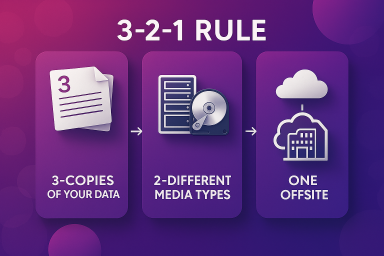
Microsoft’s geo-redundant infrastructure is designed to protect against hardware failure, not human error. When a file is deleted or ransomware encrypts a SharePoint library, that change replicates instantly across every copy. Independent backup, adhering to the 3-2-1 rule (three copies, two media types, one offsite), is the only reliable protection. Microsoft’s native tools do not satisfy this principle on their own.
A crowded market
There are now over 30 independent M365 backup providers active in the market. The practical challenge is not finding a solution, it is identifying the right one. Feature parity across the leading platforms is closer than most expect; the meaningful differences lie in pricing architecture, storage independence and long-term support for compliance and retention requirements.
ET Works’ primary recommendations are Keepit and AvePoint for the majority of M365 environments, and HYCU or Rubrik for organisations with multi-platform requirements or broader cyber recovery strategies.
Per-user or per-capacity — it matters more than you think
One of the most commercially consequential decisions is choosing between per-user and per-capacity pricing. Per-user offers predictability and suits data-heavy environments. Per-capacity can appear cheaper upfront but tends to escalate as Teams recordings, SharePoint libraries and historical backups accumulate. Modelling both scenarios against your actual data footprint before committing is essential.
Email archive is not the same as backup
These two are frequently confused. Backup protects against data loss and enables operational recovery. Archive serves compliance, eDiscovery and long-term immutable retention, captured in real time at the gateway. For organisations in regulated sectors, both are needed and both are best evaluated together.
Entra ID is also at risk
Microsoft Entra ID (formerly Azure Active Directory) is the identity backbone of your M365 environment, controlling access across every application, device and service your organisation relies on. It is also one of the most commonly overlooked gaps in an M365 backup strategy.
Microsoft provides a 30-day recycle bin for deleted users and groups, but this does not extend to conditional access policies, app registrations, role assignments or directory configurations. If any of these are accidentally deleted or maliciously modified, recovery without an independent backup is either extremely difficult or not possible at all. Entra ID coverage varies across vendors and is worth including as a specific criterion when evaluating your options.
Thinking of switching providers?
Migration is more complex than it appears. Historical backup data almost never transfers between vendors, all previous restore points become inaccessible once an outgoing contract ends. Running platforms in parallel for 30 to 90 days, exporting critical data and not cancelling the old contract prematurely are all essential steps.
Putting vendors through their paces
Where the decision carries meaningful commercial or compliance weight, ET Works recommends a structured vendor bake-off: a head-to-head evaluation of a shortlist of providers against an agreed set of technical, commercial and operational criteria. ET Works manages the process end to end, coordinating demonstrations, briefing vendors consistently and normalising pricing across different commercial models to produce a clear, like-for-like comparison.
ET Works has produced an independent advisory guide covering all of the above in more detail, including a vendor snapshot, pricing model analysis and migration guidance. If you would like a copy, get in touch and we will send one across.

Marcus Evans
Commercial Sales Manager
An industry veteran with 30+ years of supporting and advising customers on Managed IT Services plus Infrastructure, End-User Computing, Security, Networking and Business Applications. A nomadic British-Australian Dual Citizen that has lived in 7 countries and dreams of one-day getting to a single-figure golf handicap (one day…)
Show all articles by Marcus EvansRelated reading from the works
Keepit

Mimecast Cyber Resilience Solutions
The Bedford College Group Ends Support Woes with Lessons from Nutanix