Endpoint Experience - 10ZiG On Tour. We bring the lab!
Pick your date!
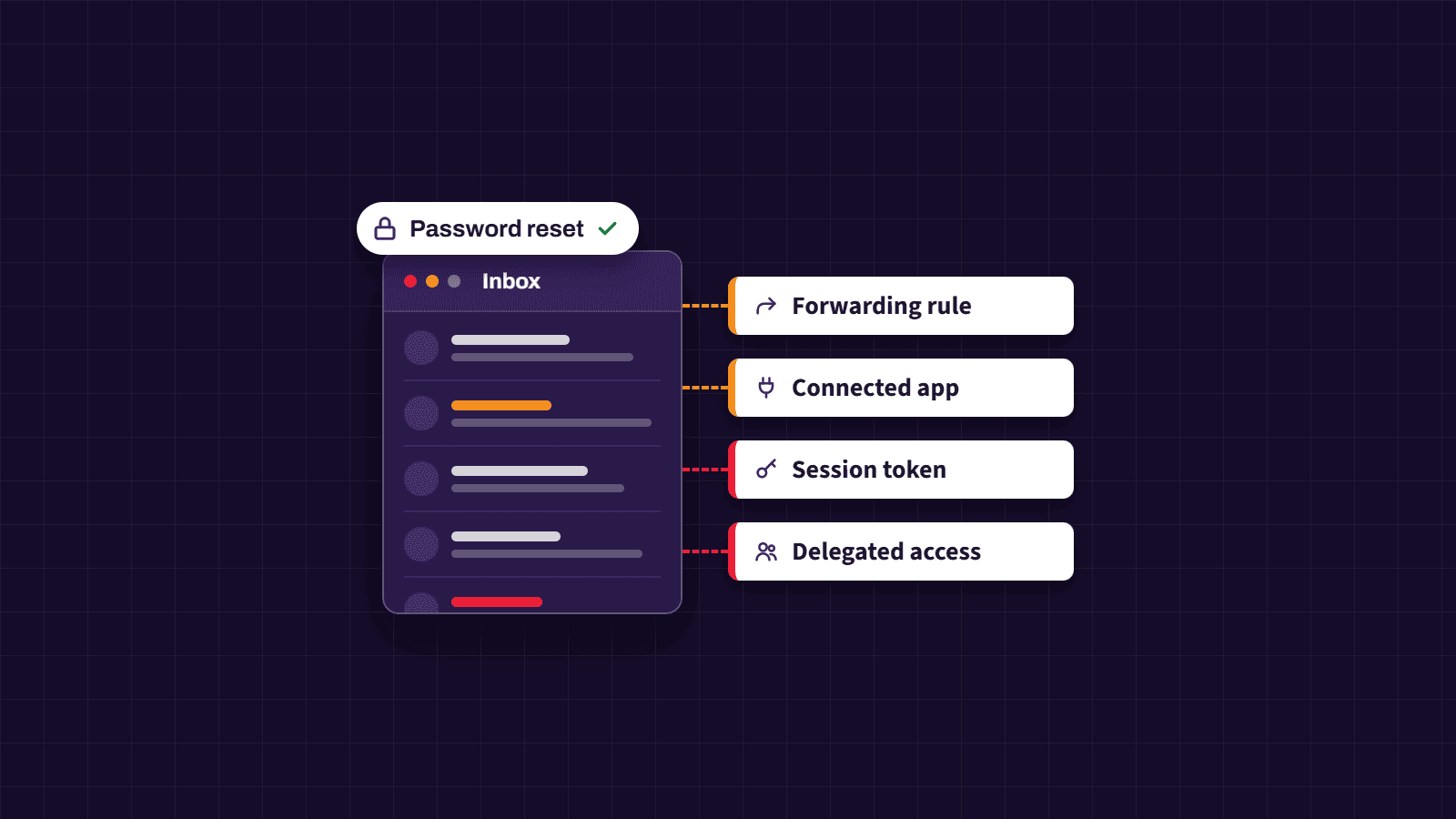

Summary: A password reset stops an attacker signing in with the old credentials. It does not end active sessions, delete forwarding rules, revoke third-party app permissions, remove delegated access, or strip out recovery methods added during the breach. Each of those has to be found and closed separately.
When a business has a compromised email account, resetting the password is the right first move. It is rarely the last one. From a Cyber Security perspective, the more useful question after a reset is whether the attacker still needs the password at all.
While inside the mailbox, an attacker has time to prepare for losing it. They may create a forwarding rule, approve a connected app, register a new sign-in method, or grant another account access. A browser session or mail app may also remain signed in. None of these depend on the original password.
Email deserves this level of scrutiny because almost everything else resets through it. Finance platforms, cloud storage, supplier portals, and line-of-business systems all send password-reset links to the inbox. Anyone who can still read that inbox can often reach those systems too. It is also the usual starting point for business email compromise, where attackers intercept invoices and redirect payments.
That is why recovery guidance from Microsoft, Google, and the UK National Cyber Security Centre goes well beyond a password change.
Email platforms use sessions so that users are not asked for a password every time they open a message. After a successful sign-in, the service issues the browser or app a cookie or token confirming that authentication has already taken place.
That token remains valid until it expires or is revoked. Depending on the platform and session type, someone who signed in before the reset may stay connected for some time afterwards.
Providers handle this differently. Google states that changing a password signs the user out in most places, but lists exceptions that can include some devices and third-party apps. Google Workspace administrators have separate controls to suspend an account and reset its sign-in cookies. Microsoft’s guidance for business accounts is similar: block sign-in while the account is investigated, and revoke active sessions as a distinct step.
A password reset also changes nothing inside the mailbox. Forwarding rules, delegates, and recovery methods added during the compromise stay in place until someone finds and removes them.
An active session is one of the first things your IT team should check.

Image source: Pexels
If the attacker signed in through a browser or mail app, that session may still hold a valid token. Information-stealing malware on a user’s device can also copy session cookies and pass them to a third party.
A stolen cookie gives the attacker a session that has already cleared the password and MFA checks. In that situation, the new password makes no difference.
The fix is to revoke all active sessions and tokens for the account from the administration console. The control has different names depending on the platform: “Revoke sessions” in Microsoft Entra ID, “Reset sign-in cookies” in Google Workspace, or “Sign out of all devices” on consumer accounts.
If malware is suspected, start the recovery from a separate, known-clean device. The affected computer should be checked, and rebuilt if necessary, before the user signs in on it again.
Once sessions are closed, the next step is to check what was changed inside the mailbox.
An attacker can set up a rule that forwards a copy of every new message to an external address. More often, the rule is targeted. It forwards only messages containing words such as “invoice”, “remittance”, “bank details”, or “password reset”.
Targeted rules are harder to spot because day-to-day email keeps arriving as normal. The attacker simply receives the messages they care about.
Rules are also used to cover tracks. A rule might move security alerts, bounce-backs, or a supplier’s reply querying a change of bank details into a folder the user never opens.
Both Microsoft and Google advise reviewing forwarding settings and mailbox rules after a suspected compromise. In Microsoft 365, this should be done from the admin side rather than only through the user’s Outlook client, because Microsoft specifically recommends checking for hidden rules as well.
Forwarding rules are one way to keep receiving email. A connected application is another.

Image source: Pexels
Organisations routinely connect mailboxes to scheduling tools, CRM platforms, mobile mail clients, e-signature services, and browser extensions. Most of these connections use OAuth. When a user approves an OAuth consent request, the app receives a token with specific permissions to the account. It never needs to store the password.
Attackers exploit this by registering an app that looks legitimate and persuading the user to approve it, a technique known as consent phishing. Microsoft notes that a malicious consent grant can give access to email, files, contacts, and forwarding rules.
Some app connections end when the password changes. Others need to be removed separately. Review every application connected to the account and remove anything the business does not recognise, use, or approve. A familiar name and logo prove nothing on their own, so your administrator should verify the publisher and the exact permissions granted.
Business email platforms let one person work in another person’s mailbox. A director might give an assistant access, for example, or a team might share a common inbox. This is delegation.
Delegates sign in with their own credentials, so resetting the mailbox owner’s password has no effect on them. Exchange Online supports Full Access, Send As, and Send on Behalf permissions, and Gmail supports delegated access too.
Review every user and group with access to the mailbox, confirm why each one needs it, and remove anything that cannot be explained. Send As permissions deserve particular attention. They allow someone to send messages that appear to come directly from the mailbox without being able to read it, which is exactly what payment fraud requires.
While in control of the account, the attacker may have registered a phone number, recovery email address, authenticator app, passkey, or security key.
A recovery method could let them reclaim the account later. A new authentication method might let them approve a sign-in or complete a reset without anyone noticing.
Microsoft advises administrators responding to a compromised mailbox to review the user’s registered MFA devices and remove anything suspicious. Google similarly recommends checking recovery details, recent security activity, signed-in devices, and sign-in methods. Go through each entry with the account owner and remove anything neither of you recognises.
Several of these settings are only visible in the platform’s admin tools. The clean-up should be handled by your IT team or managed service provider, not left to the affected user working from their own inbox.
Block sign-in or suspend the account while it is investigated, and revoke all active sessions and tokens. The user may be without email for a short period, but leaving the account live gives the attacker more time to read, send, or delete messages.
Set a strong password that has not been used anywhere else. If the old password was reused on other services, change it there too.
Never send the new password to the affected mailbox. Use a phone call, an approved password manager, or another trusted channel. Some older applications rely on separate app passwords, and Microsoft’s guidance notes these are not revoked automatically when the main password changes, so they should be removed or replaced.
Work through the following, using the admin tools rather than the user’s mail client where possible:
Once access is closed off, work out what the attacker did while they were in. Check the Sent Items, Deleted Items, Drafts, Junk, and Archive folders for messages the user did not write, replies they never saw, password-reset emails, and changes to payment details.
Your administrator should review sign-in logs, audit logs, message traces, and security alerts. Start the search before the first known warning sign, because the initial compromise may have happened earlier.
An unfamiliar sign-in location is not proof of compromise on its own. Mobile networks, VPNs, and ISPs all distort location data. The device, time, IP address, application, and surrounding activity give a more reliable picture when read together.
If personal data may have been accessed, assess whether the incident needs to be reported. Under UK GDPR, a notifiable personal data breach must be reported to the Information Commissioner’s Office within 72 hours of becoming aware of it.
If fraudulent messages were sent from the account, contact the recipients through a trusted channel. Tell them which messages were not genuine and whether they need to change a password, delete a file, or disregard a payment request.
Prioritise anything involving bank details, invoices, payroll, gift cards, or password resets. If money may have gone to the wrong account, contact the bank or payment provider immediately, using a number from its official website or your own records rather than one from the email thread.
Only return the account once every unknown setting, permission, and method has been removed. Require MFA before the user signs in again. Where the platform supports them, passkeys and FIDO2 security keys offer stronger protection against phishing than codes that can be typed into a fake sign-in page.
MFA prevents the next sign-in with a stolen password. It does not undo forwarding rules, delegates, app consents, or recovery methods that already exist, which is why the earlier steps still matter.
Most of the persistence techniques above can be restricted at tenant level before an incident happens:
ET Works is an ISO 27001-certified managed service provider. Our Cyber Security and Managed Services teams help organisations contain compromised accounts, investigate what was accessed, and put tenant-level controls in place so the same route can’t be used twice.
If you think someone still has access to a business mailbox, contact your IT provider immediately. If you don’t have one, or want a second opinion on your Microsoft 365 security posture, get in touch with the ET Works team.
Not always. Some providers end most sessions when the password changes, while others require sessions and tokens to be revoked separately. Follow the compromise guidance for the specific platform your business uses.
Yes. A forwarding rule or filter created during the compromise will keep sending copies of messages until it is removed. Check all forwarding settings and inbox rules.
Yes. Through OAuth, an app can be granted permission to access mailbox data without ever holding the password. Review connected apps and remove anything the business does not recognise.
Generally not. The account is usually blocked or suspended while it is secured and investigated. Deleting it could destroy evidence your IT team needs to understand what happened.
No. MFA helps stop new sign-ins, but it does not remove inbox rules, app permissions, delegates, recovery methods, or active sessions that already exist. Each of those needs checking separately.
Adapted with permission from [How Hackers Keep Access to Your Email After You Change the Password](https://thetechnologypress.com/how-hackers-keep-access-to-your-email-after-you-change-the-password/), published by The Technology Press.

ET Works Insights
Our Insights content is created by members of the ET Works team, drawing on wide‑ranging experience across technology, operations, service delivery, and customer support. Whether written individually or collaboratively, each article reflects our commitment to sharing practical knowledge, industry developments, and perspectives from across the business. Beyond their professional roles, our contributors bring diverse interests and backgrounds that help shape the insight and creativity behind our work.
"*" indicates required fields